







How to read your electric meter
What the meter measures
Your meter keeps track of how much power you use over time in kilowatt-hours (kWh). In simple terms, 1 kilowatt-hour = 1,000 watt-hours.
Depending on your plan, the price of electricity can fluctuate based on the demand – the average rate at which your home consumes electricity during a specific time.
You can check your energy use on a daily basis and see your demand history through SRP MyAccount™ (Opens in a new tab).
Standard meters used for basic price plans
A standard meter is a clock-like device that records the amount of electricity you use. It shows your home's electricity consumption in kWh. Some are mechanical, while others have LCD displays.
Explore standard meter models and learn how to read them below.
Models
Landis+Gyr
You can read this meter using the LCD display.
To read your kW demand, wait for the meter LCD display to cycle to code 10. The code is displayed in area 3. Your maximum kW for the day will be displayed; this is the maximum average load over a 15- or 30-minute interval (depending on your price plan) for the day.
| Code | Description of reading |
| 0 | Code 0 – Time of day (HH.MM) |
| 2 | Code 2 – Date (MM DD YY) |
| 3 | Code 3 – Total kWh read (includes on- and off-peak reads) |
| 4 | Code 4 – On-peak kWh |
| 5 | Code 5 – Off-peak kWh |
| 7 | Code 7 – Super off-peak kWh (EV price plan only) |
| 10 | Maximum kW – This is the maximum average load for the day taken over a 15- or 30- minute interval, depending on your price plan. |
| GSS | Network status code for SRP meter technicians |
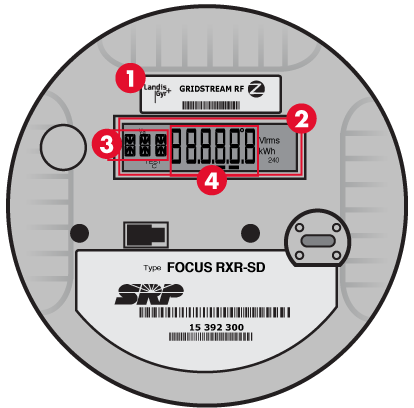
1. Meter type: Landis + Gyr, 2. Display Test: Verifies that all of the display is working properly, 3. Code identifier, 4. Description
Meters for Time-of-Use plans
On our SRP Time-of-Use Price Plan™ (TOU) plans, the amount of energy used in your home is constantly monitored and recorded by the meter. Energy is priced per kWh and your monthly energy charge is based on the total amount of energy used during the billing cycle.
Some meters provide additional data to support our TOU plans, including on- and off-peak kWh. Explore meter models and learn how to read them below.
Models
Elster REX meters include the REX1, REX2 and REX2 solar meters.
REX1
This meter can be read using the LCD on the meter itself.
| Code | Description of reading |
| 888.88 | Display test |
| t | Time of day (military time) |
| kWh | Total kWh read (includes on- and off-peak reads |
| Rate A kWh | On-peak kWh (TOU customers only) |
| Rate C kWh | Off-peak kWh (TOU customers only) |
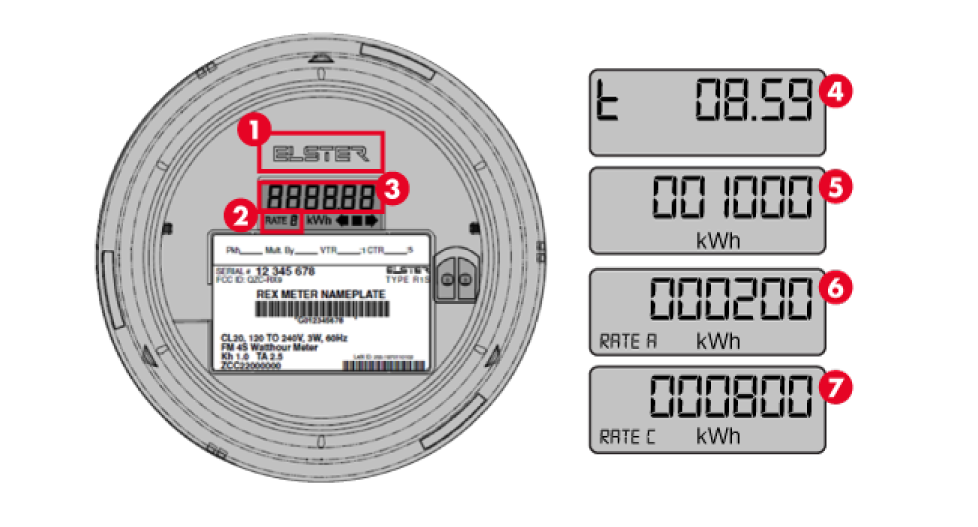
1. Meter type: Elster REX1, 2. Rate code, 3. Description of reading, 4. Current time, 5. Total kWh, 6. Tier A (on-peak), 7. Tier C (off-peak)
REX2
This meter can be read using the LCD on the meter.
| Code | Description of reading |
| 8888.88 | Display test |
| t | Time of day (military time) |
| kWh | Total kWh read (includes on- and off-peak reads) |
| Rate A kWh | On-peak kWh (TOU customers only) |
| Rate C kWh | Off-peak kWh (TOU customers only) |
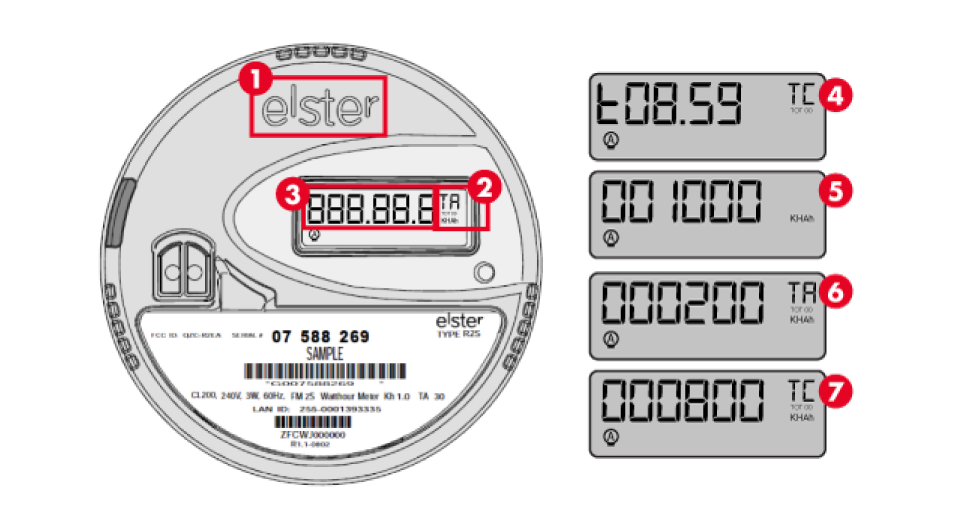
1. Meter type: Elster REX2, 2. Rate code, 3. Description of reading, 4. Current time, 5. Total kWh, 6. Tier A (on-peak), 7. Tier C (off-peak)
Meters for solar customers
Solar meters show how much electricity your system is generating, how much energy your home is using, and how much energy you’re purchasing.
See some meter models and learn how to read them below.
Models
Elster A3T meter
This meter can be read using the LCD on the meter.
| Code | Description of reading |
| 888 | Display test |
| 0 | Time of day (military time) |
| 1 | Day of week |
| 2 | Date |
| 3 | Total kWh |
| 4 | On-peak kWh (Rate A) |
| 5 | Off-peak kWh (Rate C) |
| 7 | Super off-peak kWh (Rate D - EV price plan only) |
| 10 | Maximum kW – This is the maximum average load for the day taken over a 15- or 30-minute interval, depending on your price plan. |
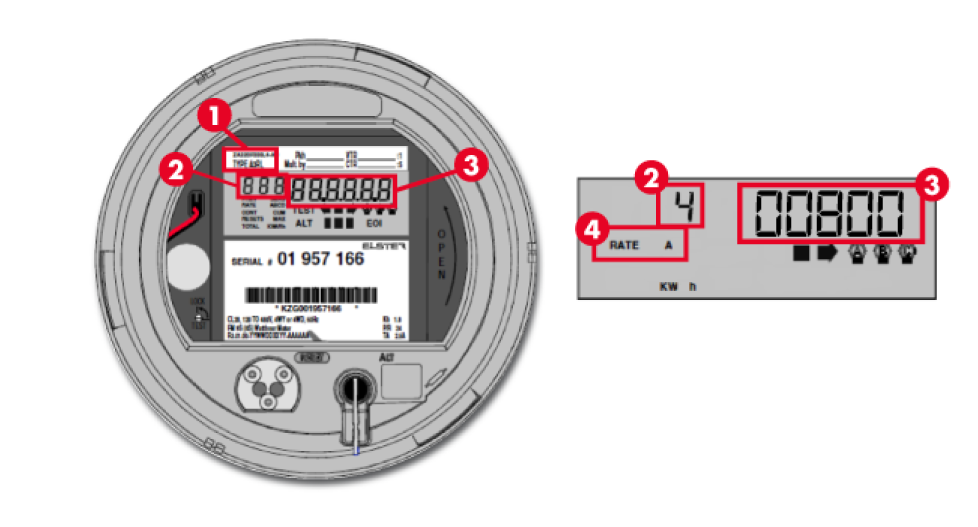
1. Meter type: Elster A3T, 2. Code identifier, 3. Display quantity, 2. Code identifier, 3. Display quantity, 4. Rate code
Landis+Gyr solar meter
The Landis+Gyr meter also works for homes with a solar electric system. Indicators at the bottom of the readout show the flow of electricity.
| Code | Description of reading |
 | When the indicators are moving from right to left, your solar system is producing energy and sending it to SRP. |
 | When the indicators are moving from left to right, your home is purchasing power from the SRP system. |
| 43* | Total exported energy |
| 44* | On-peak exported energy |
| 45* | Off-peak exported energy |
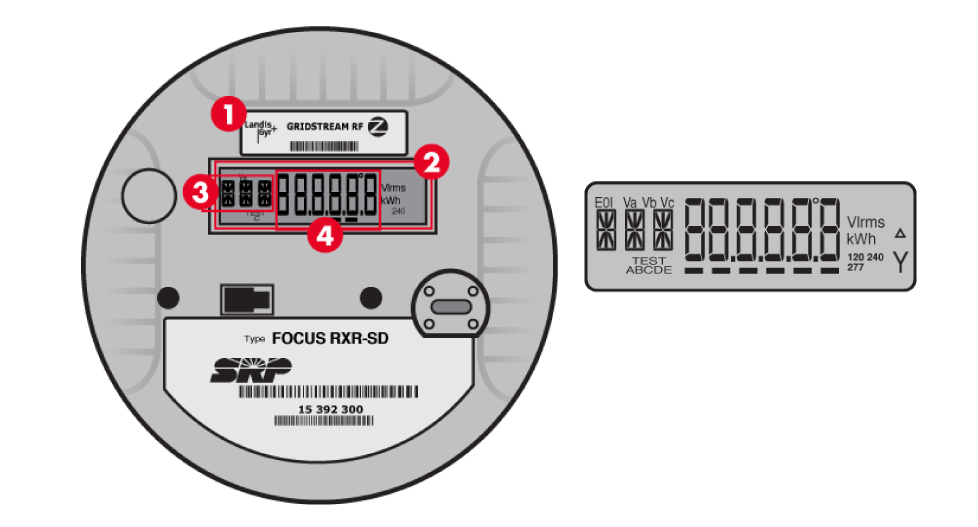
1. Meter type: Landis + Gyr, 2. Display Test: Verifies that all of the display is working properly, 3. Code identifier, 4. Description
*Only applicable to customers on the Time-of-Use Export and EV Export solar price plans.
Smart meters
Smart meters securely capture and store energy-usage data using digital technology. Equipped with two-way radio communication, they record and automatically send your energy use to SRP.
We installed our first smart meters in 2003. Today, SRP's smart meters are manufactured by Honeywell Smart Energy (formerly Elster) and Landis+Gyr.
Change out your smart meter
Smart meters provide a number of benefits, like giving customers better control over their energy usage and budgets; however, if you wish to have an alternative meter installed, and there are no meter access issues or on-site generating devices present, you can choose to opt out by calling SRP at (602) 236-8888(602) 236-8888.
With this option, SRP will switch you to the Basic Price Plan and install a standard meter, which must be read manually. This will require an additional monthly charge of $20 plus tax, which helps recover additional costs for bill processing and the costs associated with manually reading the meter.
Don’t try to adjust or repair a meter yourself. Call SRP at (602) 236-8888(602) 236-8888.
Help with damaged meters
Most meter problems are the result of vandalism, tampering or an accident. If the protective glass cover or the seals on the meter are broken, it may not operate properly.


